Mission Control
Mission Control is HAR’s open-source local dashboard. It combines run records and slot state from registered repositories without replacing the repository-owned harness.
Start the packaged dashboard
Section titled “Start the packaged dashboard”har control upThe CLI pulls the Mission Control image matching its own version and starts the app plus PostgreSQL with Docker Compose. Build the image from a source checkout instead:
har control up --buildStop it with har control down.
Register and sync
Section titled “Register and sync”Onboarding a repository remembers it for synchronization. You can also register one explicitly:
har control register --repo /path/to/projecthar control sync --repo /path/to/projectSync also runs automatically at every activity edge — login, launch, verify,
commit, complete — so registered repositories stay current without a manual
sync or a background watcher. --dry-run previews registration or sync, and
sync --json produces structured output.
Linked worktrees that store their own .har/ evidence (an in-place launch inside
an external orchestrator’s checkout) are included in that sync. Repository
identity stays the main checkout; the live occupancy of a slot is the active
session among those sources, so an idle report from main cannot blank a session
that is still running somewhere else. See
Agent integrations.
Unregister
Section titled “Unregister”Remove a repository from Mission Control (and stop auto-sync) from the CLI or the repo detail page (Unregister):
har control unregister --repo /path/to/project# non-interactive:har control unregister --repo /path/to/project --yes --delete-worktreesUnregister deletes synced runs/slots/telemetry for that path and records a
blocklist entry so background sync does not immediately re-add it. The CLI
proposes deleting session worktrees; confirm interactively or pass
--delete-worktrees. The dashboard checkbox does the same, but the packaged
Docker image often cannot see host worktree paths — use the CLI when host cleanup
is required. Re-register with har control register.
Clear all data (factory reset)
Section titled “Clear all data (factory reset)”To wipe the entire Mission Control database (and optionally scrub local harness history so a later register/sync starts empty), use Settings → Danger zone in the dashboard, or the CLI:
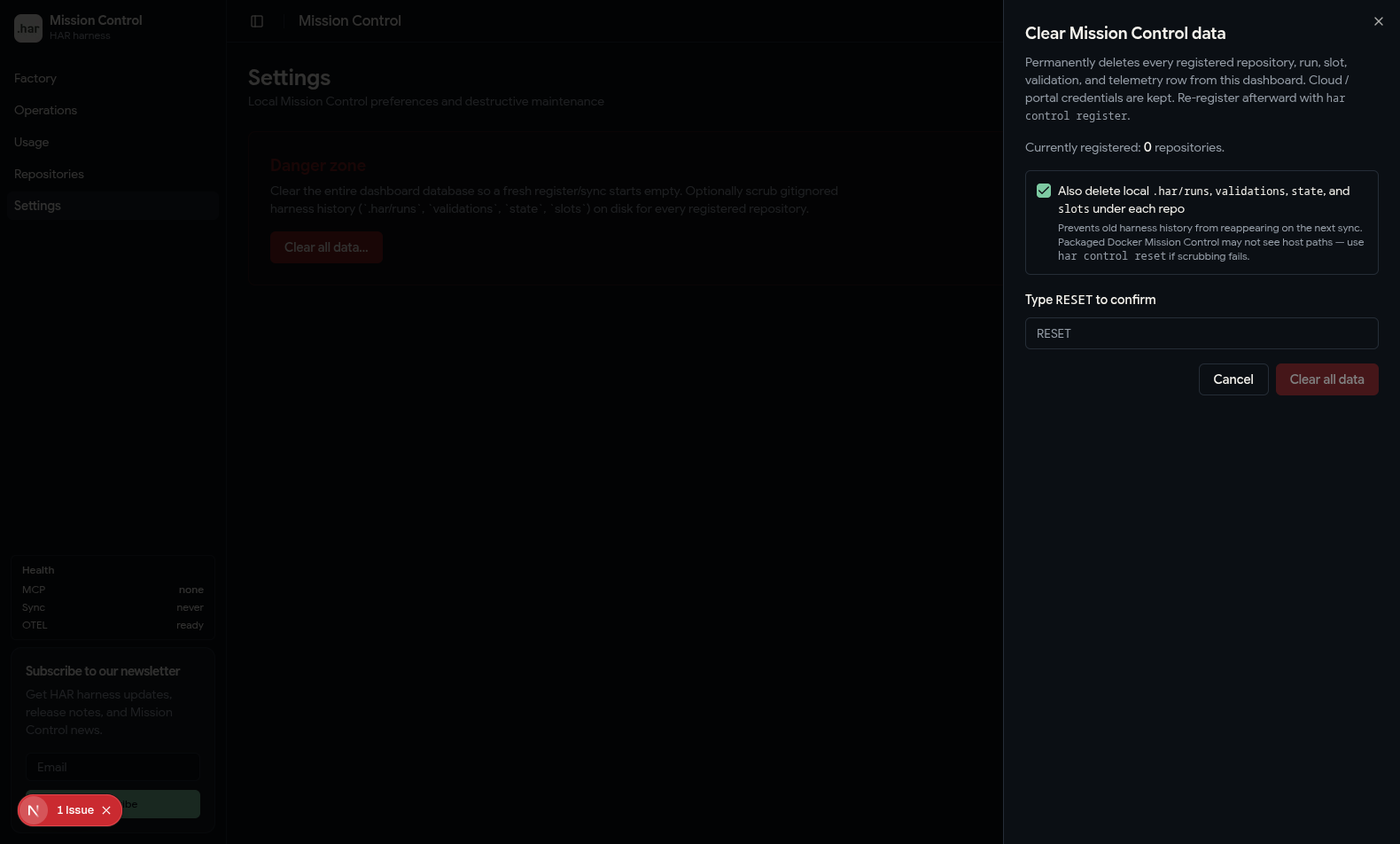
har control reset# non-interactive:har control reset --yesReset deletes every repository row (runs, slots, validations, telemetry cascade)
and clears the unregister blocklist. Cloud / portal credentials are kept.
With local scrub enabled (default), it also removes .har/runs,
.har/validations, .har/commit-bindings, .har/state, and .har/slots under each registered
repository, and clears ~/.har/repos.json. Packaged Docker Mission Control may
not see host paths — prefer the CLI when host scrubbing is required.
Re-register afterward with har control register.
Factory: work and evidence
Section titled “Factory: work and evidence”Factory is the default Mission Control experience. It answers four questions:
- What durable piece of work is this?
- Which isolated attempt executed it?
- What ran, how long did it take, and what did the agent cost?
- Which exact Git tree passed full verification?
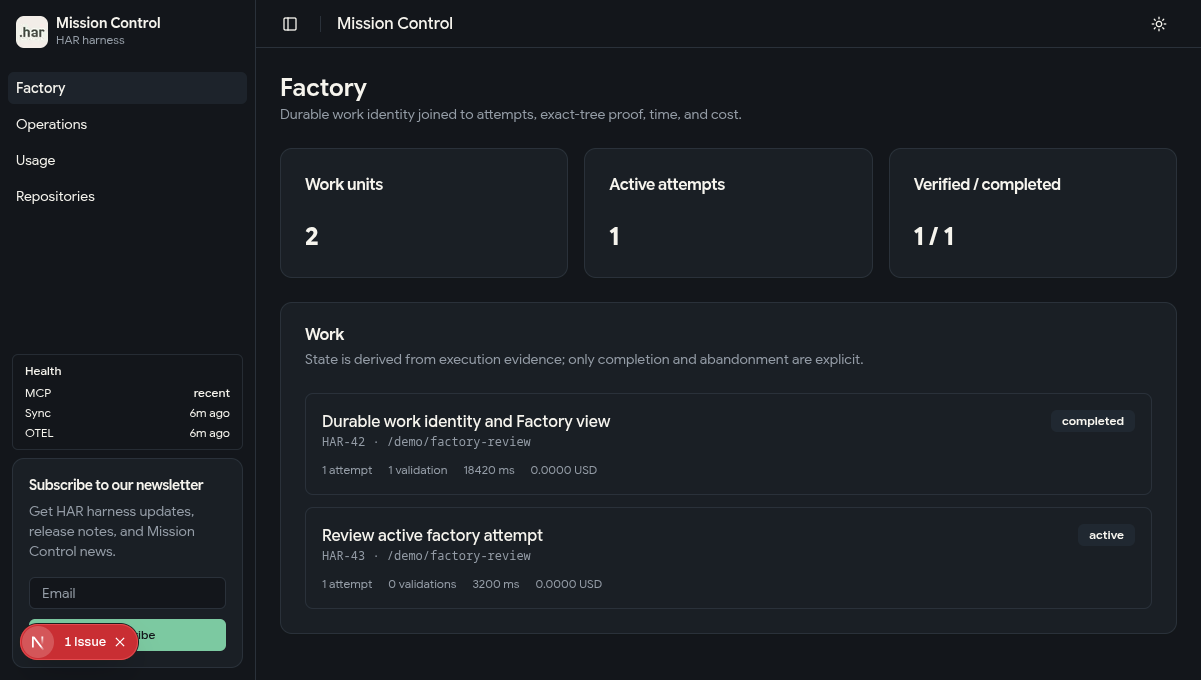
Launch with a short work identifier plus source metadata to create that evidence chain:
har env launch 1 \ --work-id "widget-123" \ --work-source github \ --work-url "https://github.com/acme/widget/issues/123" \ --work-title "Add saved filters"Bind on launch when the task names a tracker issue or ticket. Use a repo-scoped
--work-id (not a provider-prefixed composite such as github:owner/repo#123);
pass the provider in --work-source and the canonical link in --work-url. Skip
binding for ad-hoc work with no tracker identity.
Every fresh launch creates an immutable attempt ID. Runs and telemetry inherit the
work and attempt correlation. Full verification produces exact-tree proof, and
har env complete 1 records the completed outcome before teardown.
External issue → Work unit → Attempt → Slot/worktree → Runs → Exact-tree validationFactory derives active, failed, and verified state from that evidence. It stores explicit state only for business outcomes such as completed or abandoned. A plain teardown is operational cleanup and never claims success.
Historical repositories remain compatible: runs, validations, and slots without work metadata continue to appear under Operations and repository detail. They are not guessed into work units.
Factory lines
Section titled “Factory lines”Repository detail links to Factory lines (/repos/<id>/lines): a board over
the factory lines installed in that repository.
It shows stations in order, the cumulative gate and which of its stages are
green, the workstations currently in use, and the skills, MCP servers and
plugins each line declares.
The board reads the repository’s own .har/lines.json and program — the same
source har line status reads — so the dashboard and the CLI always agree. It
is read-only: installing or adapting a line is har line add plus the
adaptation prompt that install writes, and running a gate is
har line gate <station>.
Line gate stages are absent from verificationStages by design, so the board
never lists them among verification stages. It says so on the card, and flags
the reverse case — a line stage that has leaked onto the verify plan — as an
error, matching har env doctor.
A repository with a harness and no line bundle gets an empty state naming the CLI, not an install button.
Operations: runtime and infrastructure
Section titled “Operations: runtime and infrastructure”The repository overview summarizes registered projects, total runs, active slots, and harness profiles. Repository detail provides:
- active slots, worktrees, branches, preview URLs, dirtiness, and drift;
- a run timeline with stage, trigger, duration, and status;
- a History graph of content snapshots and the commits that share them, laid out by branch. Selecting a node opens the record of the attempt that produced it: verification stages, the attempt timeline, agent trajectory and the bound work unit. Slots are live data and are not linked from the record;
- expected validation stages and their latest results;
- exact-tree content snapshots (formerly listed only as change batches) and associated commits;
- files under
.har/artifacts/; - verification trends and pass rates.
The global Operations page (/worktrees) lists session worktrees across
repositories (active and idle), with an On disk indicator, row selection,
select-all, and Delete selected to remove worktree directories and clear the
matching Mission Control slot rows (repository registration is kept). It also
highlights dirty/missing paths and shows token and cost columns when agent
telemetry is enabled (see below). Click a row for the slot leaf (LLM usage +
Verify pipeline + session timeline). Packaged Docker Mission Control may not see
host paths — use har env teardown <id> on the host when deletion fails. The
repository catalog lives at /repos; cross-repo usage rollup at /usage.
Agent usage telemetry (Cursor / Claude / Codex)
Section titled “Agent usage telemetry (Cursor / Claude / Codex)”HAR attributes Cursor, Claude Code, and Codex activity to each worktree/session via
@osfactory/otel-hook and shows it in
Mission Control. Preference shape:
{ "enabled": true, "signals": { "metrics": true, "logs": true, "prompts": true, "traces": true } }Default: full telemetry on (traces + logs + derived metrics + prompts). Install
(npm install -g @osfactory/har) and the first har / MCP invocation persist this
preference to ~/.har/telemetry.json when the file is missing. Prompt text also fills
the Mission Control purpose column from the first captured user prompt.
har telemetry statushar telemetry on # full telemetry + Mission Control + @osfactory/otel-hookhar telemetry on --no-prompts # keep traces/logs/metrics; disable prompt text capturehar telemetry install-hooks # re-run Cursor / Claude / Codex hook registrationhar telemetry off # clear hooks OTLP export + stop MC auto-start; keeps historical rowsPreference is stored in ~/.har/telemetry.json. Override with HAR_TELEMETRY=0|1.
Hooks never cost you a turn
Section titled “Hooks never cost you a turn”Hooks fire on session start, every prompt, before and after every tool call, and on stop — six or more times per turn. Telemetry that blocks would therefore be paid several times over on every single turn, so the registration HAR writes is bounded on both sides:
- Each generated hook entry carries an explicit
timeout(10s), instead of the agent’s much longer default. - The wrapper caps the export itself (1.5s) and the flush (0.5s), and always exits 0. A dropped telemetry event must never fail a tool call.
The practical consequence: if Mission Control is not running, a turn costs a
fraction of a second per hook rather than stalling. har telemetry status warns
when hooks are installed and the collector is unreachable, since that
combination is pure cost.
Hooks config lives at ~/.har/otel-hooks/otel_config.json (HAR_OTEL_HOOKS_HOME to override).
The package itself is installed under ~/.har/otel-hooks/node_modules (pinned
@osfactory/otel-hook).
Upgrading from the Python hook
Section titled “Upgrading from the Python hook”Run har telemetry install-hooks after upgrading HAR. HAR installs the TypeScript
package in its managed hooks directory, replaces existing HAR hook registrations,
and then removes the legacy opentelemetry-hooks tool when it was installed with
uv or pipx. The command name remains otel-hook, but HAR registrations use
~/.har/otel-hooks/run-otel-hook.sh; the old Python executable does not need to
remain on PATH. Python is no longer required for HAR telemetry.
For a standalone, user-wide otel-hook command outside HAR, install it separately
with npm install -g @osfactory/otel-hook.
When telemetry is on:
har env launchauto-starts Mission Control if it is not reachable (har control up).har telemetry on(and launch) install@osfactory/otel-hookand register Cursor / Claude / Codex hooks to export OTLPhttp/protobufto{HAR_CONTROL_API_URL}/api/otel.- Launch writes session attribution into
.env.agent.<id>(HAR_SESSION_KEY, resource attrs). Mission Control matches sessions byhar.session_keyor by workspace/cwd → slot work dir. - Token usage is derived from span
gen_ai.usage.*attributes.har control syncalso harvests local Claude/Codex session files as a fallback when hooks telemetry is missing.
Privacy: prompt text is included by default and stays in local Mission Control (SQLite).
Opt out with har telemetry on --no-prompts or disable everything with har telemetry off.
No agent content? Check the prompts signal
Section titled “No agent content? Check the prompts signal”Prompt capture stays on by default — that is a product choice, not an oversight: without it Mission Control and a hosted portal have no session content to show, and a surface with no turns is indistinguishable from a session that had none. Turning it off is the deliberate opt-out, and it is silent by design:
- With
promptsoff (har telemetry on --no-prompts, orhar telemetry off), the Claude transcript harvest contributes zero events — and it is the only event harvest there is, since the Codex one covers usage alone. Anything that still appears is mirrored from otel spans, so turn counts read 0 for sessions that really had turns. har telemetry statusprints the effective signals;har control sync --fullwarns when prompt capture is the reason no content is leaving the machine.- A harvested stream longer than 1000 events keeps the most recent 1000 and marks
the oldest surviving event with
har.harvest.truncated,har.harvest.dropped_eventsandhar.harvest.total_events, so a clipped session is labelled as clipped rather than looking complete.
Harvested events cover every transcript the slot owns, and fall back to the main checkout’s only when the slot has none — the same primary/fallback tier the token harvest uses, so content and usage always describe the same session.
Trajectory ledger
Section titled “Trajectory ledger”The slot Trajectory tab is assembled from an append-only ledger, not from the usage/event tables. OTLP ingest and harvest write canonical facts first; event, span, and usage rows are projections of those facts.
| Concern | Behavior |
|---|---|
| Order | Producer sequence, then event timestamp, then source / event id / content key. Ingestion order is not canonical. |
| Duplicates | The same (source, sourceEventId, contentKey) is stored once. Replayed OTLP does not create a second row. |
| Late arrival | Out-of-order facts keep their sequence. The live viewer repairs gaps after reconnect instead of appending blindly. |
| Partial content | contentDisclosure records full, redacted, masked, truncated, withheld, or metadata_only. Withheld and metadata-only bodies are not rendered. |
| Secrets | Attribute leaves such as authorization or api_key are stored as [redacted] and never used as prompt/response text. |
| Size | Bodies over HAR_TRAJECTORY_MAX_PAYLOAD_BYTES (default 64 KiB) are truncated. Binary tool payloads are omitted. |
| Retention | HAR_TRAJECTORY_RETENTION_DAYS=0 (default) keeps rows. A positive value expires ledger, event, and span rows older than that. Usage totals stay. |
| Export / delete | The slot viewer can download the session as local JSONL or delete that session’s trajectory. Factory reset still wipes the whole database. |
| Local vs remote | Default Mission Control is local SQLite. Export is a local download. A hosted portal receives these bodies only after you opt in (see below). |
Forwarding the ledger to a hosted portal
Section titled “Forwarding the ledger to a hosted portal”har control sync pushes runs, slots and token counts to a hosted portal, but the
ledger’s prompts, tool arguments and tool results stay local until you say
otherwise:
har control trajectory # show the current settinghar control trajectory on # forward prompts / tool payloadshar control trajectory off # back to counts and events only (default)HAR_PORTAL_TRAJECTORY=on|off overrides the stored choice for one sync, and
telemetry must be on either way. Use har control trajectory on --target … when
this checkout is attached to more than one HQ workspace — forwarding is stored
per connection so a private dev workspace can receive prompts without enabling
them for production. What is forwarded goes through the same policy as
what is stored: bodies are capped at HAR_TRAJECTORY_MAX_PAYLOAD_BYTES, secret
attributes are [redacted], and contentDisclosure travels with each record so a
truncated or withheld body is labelled as such remotely instead of arriving as
apparently-complete text. The policy is applied again on the way out, so tightening
the cap also bounds records stored under a looser one.
Forwarding is idempotent on (source, sourceEventId, contentKey) and watermarked
independently of the event and run batches — enabling it later still sends the
backlog rather than starting from that moment.
Projected spans ride along with telemetry rather than with this opt-in: they carry call structure and timing, and their attributes were already redacted when the span was projected.
Local development
Section titled “Local development”Mission Control’s source has its own harness:
cd controlhar env launch 1Use this path for development, manual testing, and screenshots. Do not run it on the
same port as the packaged har control up instance. Harness preflight detects the
conflict and can select another port in the slot lane.
HAR HQ
Section titled “HAR HQ”har hq connect opens browser SSO (or stores --api-key) and attaches the current
repository to the workspace you pick in the portal. Other locally registered
repositories are listed with a count so you can send all of them to one workspace,
or assign leftover paths per workspace. Unattached checkouts are not ingested into
the only leftover connection. Saved connections live in ~/.har/portal-targets.json;
har hq list / har hq disconnect manage them. Workspace choices are never
committed into .har/. har control login still works as a deprecated alias.
har control sync --cloud targets HAR Cloud. Hosted coordination is separate from
the local open-source dashboard and portable .har/ contract.